ScyllaDB University Live | Free Virtual Training Event
Learn more
ScyllaDB Documentation Logo Documentation
  • Deployments
    • Cloud
    • Server
  • Tools
    • ScyllaDB Manager
    • ScyllaDB Monitoring Stack
    • ScyllaDB Operator
  • Drivers
    • CQL Drivers
    • DynamoDB Drivers
    • Supported Driver Versions
  • Resources
    • ScyllaDB University
    • Community Forum
    • Tutorials
Install
Search Ask AI
ScyllaDB Docs ScyllaDB Cloud Create & Connect to Your Cluster CQL Console BETA
For AI agents: a documentation index is available at https://cloud.docs.scylladb.com/master/llms.txt. A Markdown version of this page is at https://cloud.docs.scylladb.com/master/cloud-setup/cql-console.md.

CQL Console BETA

The CQL Console lets you run CQL queries against a ScyllaDB Cloud cluster directly from your browser. You don’t need to install cqlsh, drivers, or any other client tools, and you don’t need to add your IP address to the cluster’s allowed IP list.

Use the CQL Console to:

  • Create keyspaces and tables and insert your first rows.

  • Check a schema or inspect data.

  • Run ad-hoc queries.

Prerequisites

  • A ScyllaDB Cloud cluster with public connectivity. The CQL Console is not available for clusters that are reachable only through VPC peering or private connectivity.

  • The username and password of a database role. The default credentials are shown on your cluster’s Connect tab.

Open the CQL Console

  1. Open the cluster you want to query.

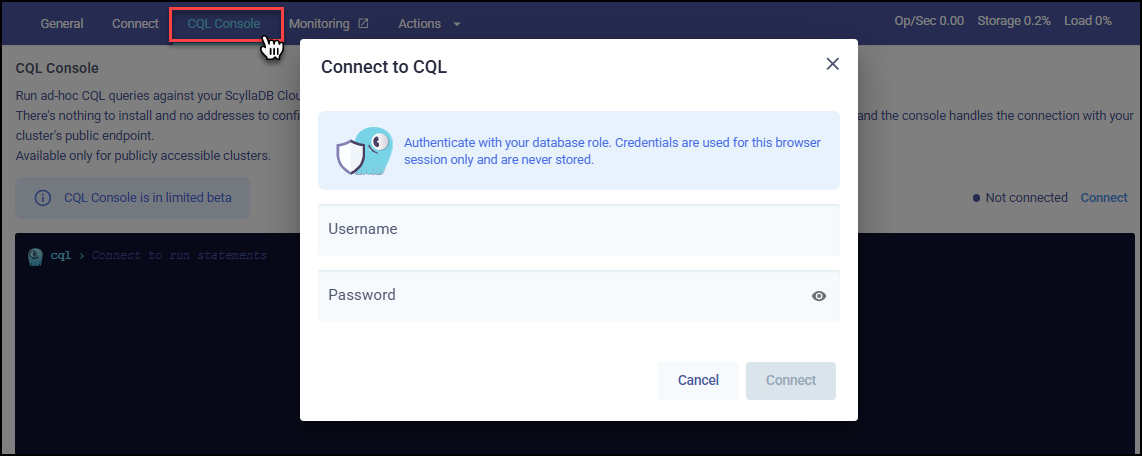
  2. Click the CQL Console tab.

    The Connect to CQL dialog on the CQL Console tab, with the Username and Password fields
  3. Enter your username and password. You can find the default credentials on your cluster’s Connect tab. Your credentials are used only for the current browser session and are never stored.

  4. Click Connect.

When you’re connected, you can type CQL statements at the cql prompt and press Enter to run them.
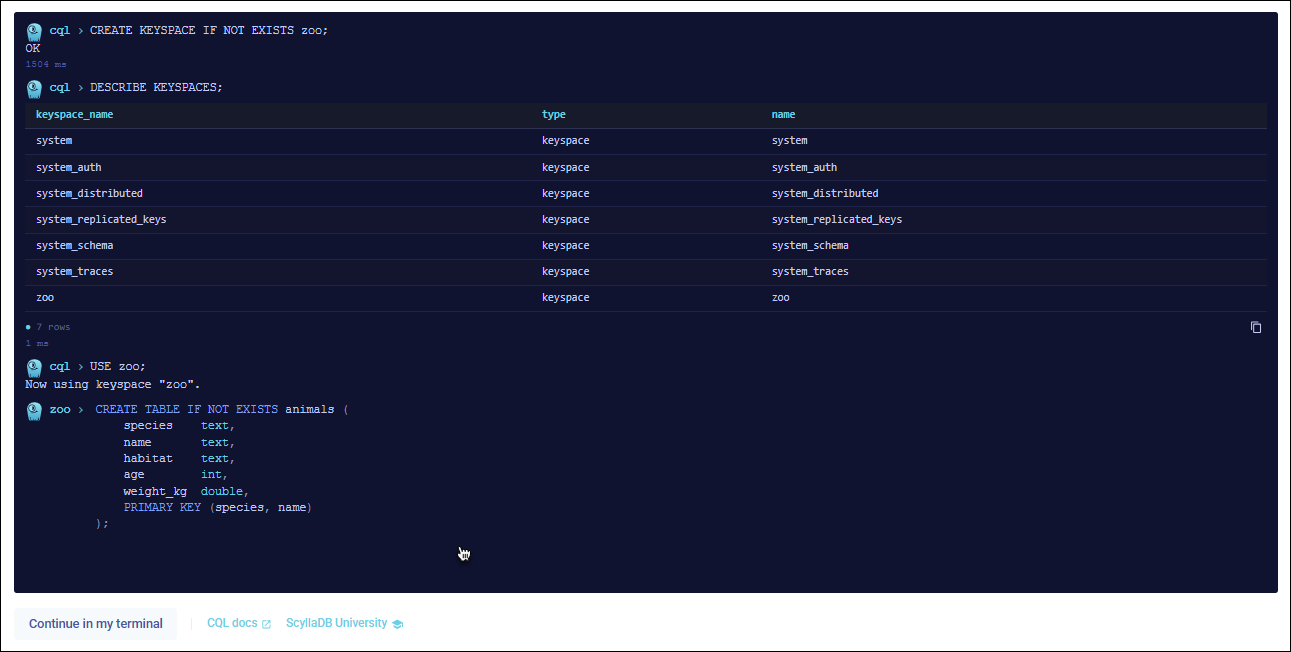
The CQL Console showing the results of CREATE KEYSPACE, DESCRIBE KEYSPACES, USE, and CREATE TABLE statements

To use cqlsh in your terminal instead, click Continue in my terminal below the console.

Example: From a New Cluster to Your First Rows

This example creates a keyspace and a table for zoo animals, adds a few rows, and queries them. Run the statements one by one.

List keyspaces:

DESCRIBE KEYSPACES;

Create a keyspace and a table:

CREATE KEYSPACE IF NOT EXISTS zoo;

USE zoo;

CREATE TABLE IF NOT EXISTS animals (
    species    text,
    name       text,
    habitat    text,
    age        int,
    weight_kg  double,
    PRIMARY KEY (species, name)
);

In this table, species is the partition key, so all animals of the same species are stored together. name is the clustering key, which identifies each animal within its species.

Insert data:

INSERT INTO animals (species, name, habitat, age, weight_kg)
VALUES ('lion', 'Leo', 'savanna', 6, 190.5);

INSERT INTO animals (species, name, habitat, age, weight_kg)
VALUES ('lion', 'Zara', 'savanna', 5, 126.0);

INSERT INTO animals (species, name, habitat, age, weight_kg)
VALUES ('penguin', 'Pebble', 'antarctic', 3, 22.3);

Query data:

SELECT * FROM animals WHERE species = 'lion';

SELECT name, habitat, age FROM animals
WHERE species = 'penguin' AND name = 'Pebble';

Show the table definition:

DESCRIBE TABLE zoo.animals;

To remove the example data, drop the keyspace:

DROP KEYSPACE zoo;

Related Topics

  • Connect to Your Cluster

  • CQL reference

  • ScyllaDB drivers

Was this page helpful?

PREVIOUS
Connect to Your Cluster
NEXT
X Cloud Autoscaling Behavior and Best Practices
  • Create an issue

On this page

  • CQL Console BETA
    • Prerequisites
    • Open the CQL Console
    • Example: From a New Cluster to Your First Rows
    • Related Topics
ScyllaDB Cloud
Search Ask AI
  • Get Started
    • What Is ScyllaDB Cloud?
    • Free Trial
    • Quick Start Guide
    • Billing and Pricing
  • Create & Connect to Your Cluster
    • Deployment Overview
    • Configure and Launch a Cluster
    • Connect to Your Cluster
    • CQL Console
    • X Cloud Autoscaling Behavior and Best Practices
    • Deploy to Your Own AWS Account (BYOA)
    • Deploy to Your Own GCP Account (BYOA)
    • Configure Availability Zones
    • Cluster Setup Best Practices
    • Standard Clusters
  • Configure Network Access
    • Network Access Options
    • Configure AWS Transit Gateway (TGW) VPC Attachment Connection
    • Configure VPC Peering
      • VPC Peering with AWS
      • VPC Peering with GCP
    • Configure Private Connectivity
      • Private Connectivity with AWS
        • Configure AWS PrivateLink in ScyllaDB Cloud
        • Connect Your AWS VPC to ScyllaDB Cloud
      • Private Connectivity with GCP
        • Configure GCP Private Service Connect in ScyllaDB Cloud
        • Connect Your GCP VPC to ScyllaDB Cloud
    • Migrate a Cluster Connection
    • Check Cluster Availability
    • Glossary for Cluster Connections
  • Operate and Manage Clusters
    • Resize a Cluster
    • Add a Datacenter
    • Delete a Cluster
    • Configure Maintenance Windows
    • Configure Notifications
    • Track Resource Usage
    • Monitor Clusters
    • Monitor with Prometheus
    • Backups
  • Use ScyllaDB
    • Application Best Practices
    • Apache Cassandra Query Language (CQL)
    • ScyllaDB Drivers
    • Data Modeling
    • Tracing
    • Change Data Capture (CDC)
    • Role Based Access Control (RBAC)
    • ScyllaDB Alternator (DynamoDB-compatible API)
    • Lightweight Transactions (LWT)
    • ScyllaDB Integrations
  • Security
    • Security Best Practices
    • Security Concepts
    • Database-level Encryption
    • Storage-level Encryption
    • Client-to-node Encryption
    • Service Users
    • User Management
    • SAML Single Sign-On (SSO)
    • Immutable (WORM) Backups
    • Data Privacy and Compliance
  • Vector and Text Search
    • Quick Start Guide
    • Vector and Text Search Concepts
    • Vector and Text Search Deployments
    • Sizing and Capacity Planning
    • Working with Vector and Text Search
    • Working with Full Text Search
    • Vector Search with Alternator
    • Filtering
    • Quantization and Rescoring
    • LangChain and CassIO Compatibility
    • Security
    • Troubleshooting
    • FAQ
    • Glossary
    • Reference
    • Example Project
  • Cost Optimization
    • Cost Optimization Overview
    • Advanced Internode (RPC) Compression
    • Datacenter Placement and Data Transfer Costs
  • Automate with the ScyllaDB Cloud API
    • Programmatic Access Overview
    • Create a Personal Token for Authentication
    • API Reference
    • API Error Codes
    • Terraform Provider for ScyllaDB Cloud
    • ScyllaDB Cloud MCP Server
  • Get Help
    • FAQ
    • Tutorials
    • Getting Help
Docs Tutorials University Contact Us About Us
© 2026, ScyllaDB. All rights reserved. | Terms of Service | Privacy Policy | ScyllaDB, and ScyllaDB Cloud, are registered trademarks of ScyllaDB, Inc.
Last updated on 20 Nov 2026.
Powered by Sphinx 9.1.1 & ScyllaDB Theme 1.10.0