
ScyllaDB University Live | Free Virtual Training Event
Learn more
ScyllaDB Documentation Logo Documentation
  • Deployments
    • Cloud
    • Server
  • Tools
    • ScyllaDB Manager
    • ScyllaDB Monitoring Stack
    • ScyllaDB Operator
  • Drivers
    • CQL Drivers
    • DynamoDB Drivers
    • Supported Driver Versions
  • Resources
    • ScyllaDB University
    • Community Forum
    • Tutorials
Install
Search Ask AI
ScyllaDB Docs ScyllaDB Cloud Operate and Manage Clusters Deleting a Cluster
For AI agents: a documentation index is available at https://cloud.docs.scylladb.com/master/llms.txt. A Markdown version of this page is at https://cloud.docs.scylladb.com/master/operate/scylla-cloud-delete-cluster.md.

Deleting a Cluster

To delete a cluster, choose Actions> Delete Cluster from the drop-down navigation bar in your cluster’s view.

You must have the ADMIN role role to delete a cluster.

Caution

A deleted cluster cannot be restored.

Retaining Backups After Deletion

When a cluster is deleted, its nightly backups are retained for 1 day by default to help protect you from accidental data loss. You can configure the retention period (up to 60 days) or disable it entirely so that backups are deleted immediately along with the cluster.

Backup retention after deletion does not apply to clusters that are less than 24 hours old, as they may not have any backups yet.

Configuring Backup Retention

ScyllaDB Cloud UI

When deleting a cluster, the Preserve my backups option is enabled by default, retaining backups for 1 day. You can increase the retention period up to 60 days. To delete backups immediately along with the cluster, disable the Preserve my backups option.
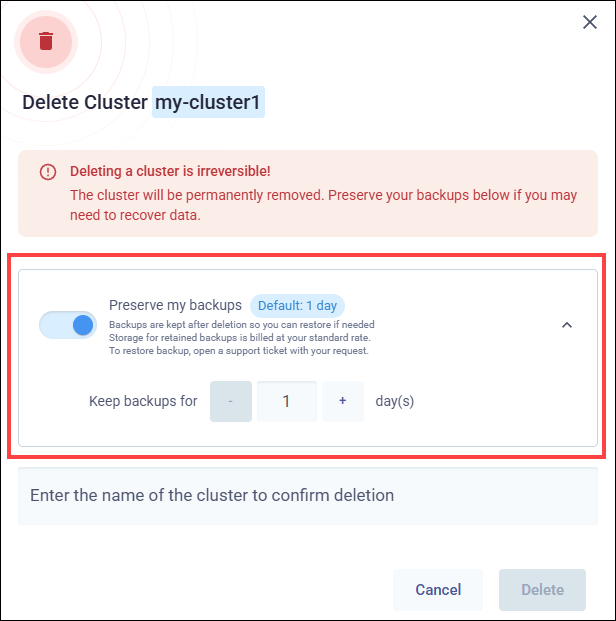
Preserve my backups option in the Delete Cluster dialog, showing the toggle enabled and the Keep backups for field set to 1 day

ScyllaDB Cloud API

Use the backupRetentionDays parameter in the Delete Cluster endpoint to set the number of days (0–60) to retain backups after deletion.

Terraform Provider

Use the backup_retention_days parameter in the scylladbcloud_cluster resource to set the number of days (0–60) to retain backups after deletion.

Was this page helpful?

PREVIOUS
Adding a Datacenter
NEXT
Configuring Maintenance Windows
  • Create an issue

On this page

  • Deleting a Cluster
    • Retaining Backups After Deletion
      • Configuring Backup Retention
ScyllaDB Cloud
Search Ask AI
  • Get Started
    • What Is ScyllaDB Cloud?
    • Free Trial
    • Quick Start Guide
    • Billing and Pricing
  • Create & Connect to Your Cluster
    • Deployment Overview
    • Choose Your Cluster Type
      • Cluster Types Overview
      • X Cloud Clusters
      • X Cloud Autoscaling Behavior and Best Practices
      • Standard Clusters
    • Deploy to Your Own AWS Account (BYOA)
    • Deploy to Your Own GCP Account (BYOA)
    • Configure Availability Zones
    • Connect to Your Cluster
    • Cluster Setup Best Practices
  • Configure Network Access
    • Network Access Options
    • Configure AWS Transit Gateway (TGW) VPC Attachment Connection
    • Configure Virtual Private Cloud (VPC) Peering with AWS
    • Configure Virtual Private Cloud (VPC) Peering with GCP
    • Migrate a Cluster Connection
    • Check Cluster Availability
    • Glossary for Cluster Connections
  • Operate and Manage Clusters
    • Resize a Cluster
    • Add a Datacenter
    • Delete a Cluster
    • Configure Maintenance Windows
    • Configure Notifications
    • Track Resource Usage
    • Monitor Clusters
    • Monitor with Prometheus
    • Backups
  • Use ScyllaDB
    • Application Best Practices
    • Apache Cassandra Query Language (CQL)
    • ScyllaDB Drivers
    • Data Modeling
    • Tracing
    • Change Data Capture (CDC)
    • Role Based Access Control (RBAC)
    • ScyllaDB Alternator (DynamoDB-compatible API)
    • Lightweight Transactions (LWT)
    • ScyllaDB Integrations
  • Security
    • Security Best Practices
    • Security Concepts
    • Database-level Encryption
    • Storage-level Encryption
    • Client-to-node Encryption
    • Service Users
    • User Management
    • SAML Single Sign-On (SSO)
    • Immutable (WORM) Backups
    • Data Privacy and Compliance
  • Vector Search
    • Quick Start Guide
    • Vector Search Concepts
    • Vector Search Deployments
    • Sizing and Capacity Planning
    • Working with Vector Search
    • Vector Search with Alternator
    • Filtering
    • Quantization and Rescoring
    • LangChain and CassIO Compatibility
    • Security
    • Troubleshooting
    • FAQ
    • Glossary
    • Reference
    • Example Project
  • Cost Optimization
    • Cost Optimization Overview
    • Advanced Internode (RPC) Compression
    • Datacenter Placement and Data Transfer Costs
  • Automate with the ScyllaDB Cloud API
    • Programmatic Access Overview
    • Create a Personal Token for Authentication
    • API Reference
    • API Error Codes
    • Terraform Provider for ScyllaDB Cloud
    • ScyllaDB Cloud MCP Server
  • Get Help
    • FAQ
    • Tutorials
    • Getting Help
Docs Tutorials University Contact Us About Us
© 2026, ScyllaDB. All rights reserved. | Terms of Service | Privacy Policy | ScyllaDB, and ScyllaDB Cloud, are registered trademarks of ScyllaDB, Inc.
Last updated on 30 Jul 2026.
Powered by Sphinx 9.1.0 & ScyllaDB Theme 1.9.3