
Was this page helpful?
Track Resource Usage
The Usage Dashboard shows how many resources your account consumes over time: compute (nodes and node hours), backup storage and requests, and network traffic. It has two tabs:
Usage Graphs – Charts that show how your usage changes over time.
Detailed Usage – A table with every usage record behind the charts, which you can filter and export to a CSV file.
The dashboard is built on the ScyllaDB Cloud Metering API, so it shows the same data that you can retrieve programmatically. See the Metering endpoints of the ScyllaDB Cloud API in the API Reference.
Only users with the Admin role can open the Usage Dashboard. See User Roles.
Open the Usage Dashboard
Select Usage from the menu in the top-right corner of the ScyllaDB Cloud console to open the Usage Dashboard. The dashboard opens on the Usage Graphs tab.
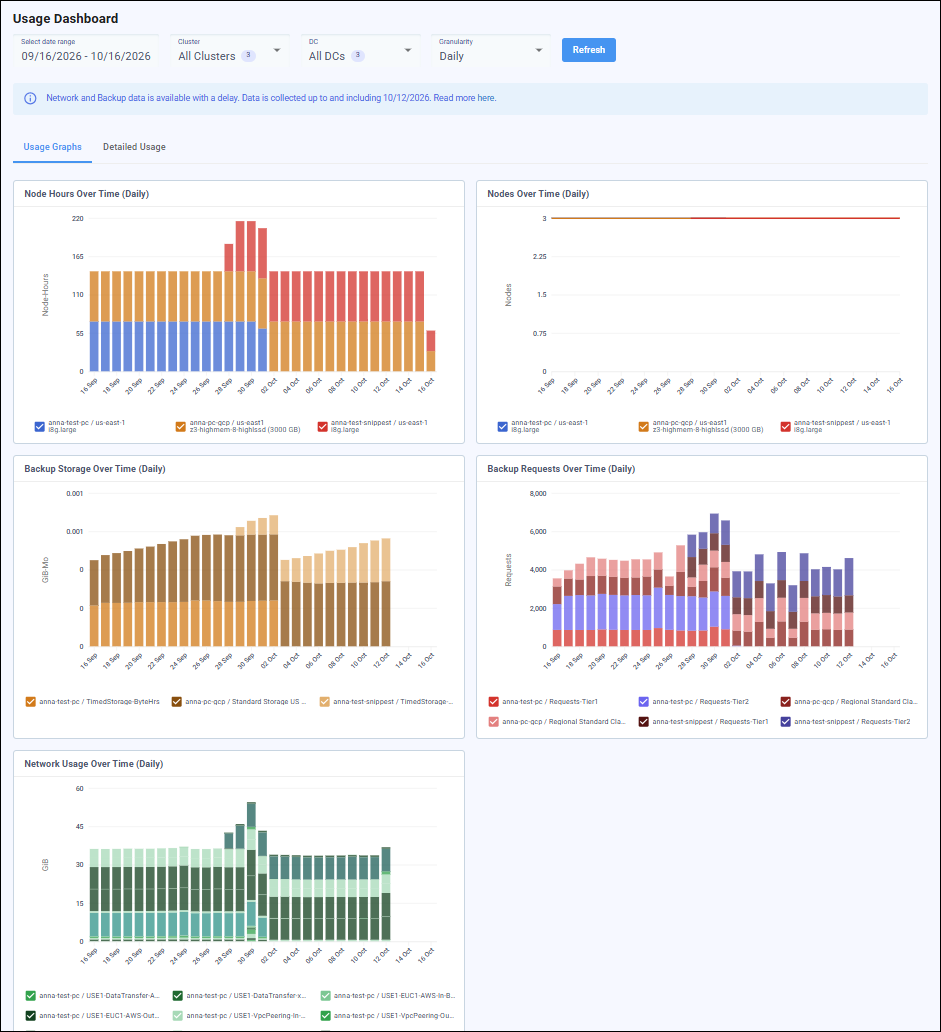
Select the Data to Display
The filters at the top of the page apply to both tabs: to all charts on the Usage Graphs tab and to the table on the Detailed Usage tab.
Select date range – The start and end dates of the period you want to review. Daily data is available for up to one year back, and hourly data for about one month back.
Cluster – One, several, or all clusters in your account. The default is All Clusters.
DC – One, several, or all datacenters. The default is All DCs.
Granularity – Whether each data point covers a day (Daily) or an hour (Hourly).
After you change the filters, click Refresh to load the data.
Data Availability
Compute data reflects the current activity of your clusters. Network and backup data is available with a delay of several days and is not final until the cloud provider settles it. The banner at the top of the dashboard shows the last date for which network and backup data has been collected. For example, “Data is collected up to and including 09/27/2026” means that the network and backup charts show no data for later dates yet.
Network and backup data is available from May 1, 2026. For earlier dates, these charts show no data.
For clusters deployed with the Bring Your Own Account (BYOA) model, the dashboard shows compute data only. Network and backup resources of BYOA clusters are billed by your cloud provider directly.
Usage Graphs
The Usage Graphs tab shows a chart for each type of usage. The chart titles include the selected granularity.
Use the checkboxes in the legend below each chart to show or hide clusters.
Node Hours Over Time
How long your nodes ran in each period, in node hours, broken down by cluster, datacenter, and instance type.
Nodes Over Time
The number of nodes that ran concurrently in each period, broken down by cluster, datacenter, and instance type.
Backup Storage Over Time
The amount of backup data stored in each period, in GiB-Mo (gibibyte-months), broken down by cluster and storage type.
Backup Requests Over Time
The number of requests made to the backup storage in each period, broken down by cluster and request tier.
Network Usage Over Time
The amount of network traffic in each period, in GiB, broken down by network type.
Detailed Usage
The Detailed Usage tab shows your full usage as the cloud provider (AWS or Google Cloud) reports it, with one row for each resource, usage type, and day or hour. Where the charts summarize usage by cluster, the table lets you see which individual instances, backups, and network resources contributed to it.
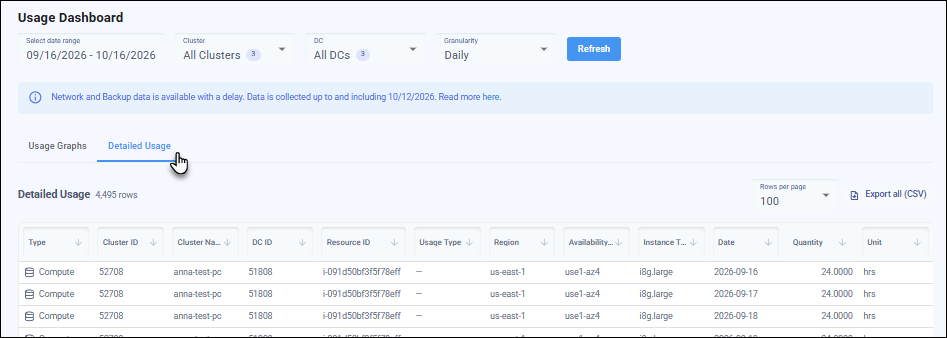
The table has the following columns. They are the same columns, in the same order, as in the CSV output of the Metering API.
Column |
Description |
|---|---|
Type |
The type of usage: Compute, Backup, or Network. |
Cluster ID |
The ID of the cluster. |
Cluster Name |
The name of the cluster. |
DC ID |
The ID of the datacenter. |
Resource ID |
The resource that generated the usage: the instance ID for Compute, the cluster ID for Backup, and the network group ID for Network. |
Usage Type |
The usage type reported by the cloud provider, for example, a type of data transfer or a backup request tier. |
Region |
The cloud provider region. |
Availability Zone Id |
The ID of the availability zone. |
Instance Type |
The instance type of the node. |
Date |
The day or hour that the row covers, depending on the selected granularity. |
Quantity |
The amount of usage, in the unit shown in the Unit column. |
Unit |
The unit of the quantity, for example, hours for Compute. Network and backup usage on Google Cloud is shown in GiB and GiB-Mo, so that it matches the charts. Network and backup usage on AWS is shown in the units that AWS reports. |
Backup storage in GiB-Mo is spread across the month: each daily or hourly row holds a fraction of the monthly amount, and all rows for a month add up to the monthly figure.
Filter and Sort the Table
In addition to the filters at the top of the page, you can filter the table by each column (except Quantity). Use the filter in the column header to select the values to display or to set a condition.
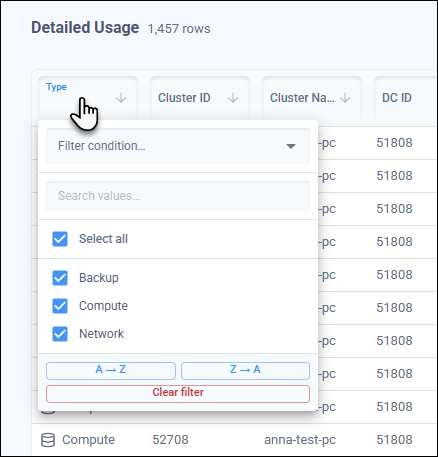
You can sort the table by any column (including Quantity).
The column filters only narrow down the rows that are already loaded. To load data for another date range, cluster, datacenter, or granularity, change the filters at the top of the page and click Refresh.
Use Rows per page to choose how many rows to display on a page.
Export Usage Data to a CSV File
Click Export all (CSV) to download the usage data as a CSV file, for example, to analyze it in a spreadsheet. The button is unavailable when the table is empty.
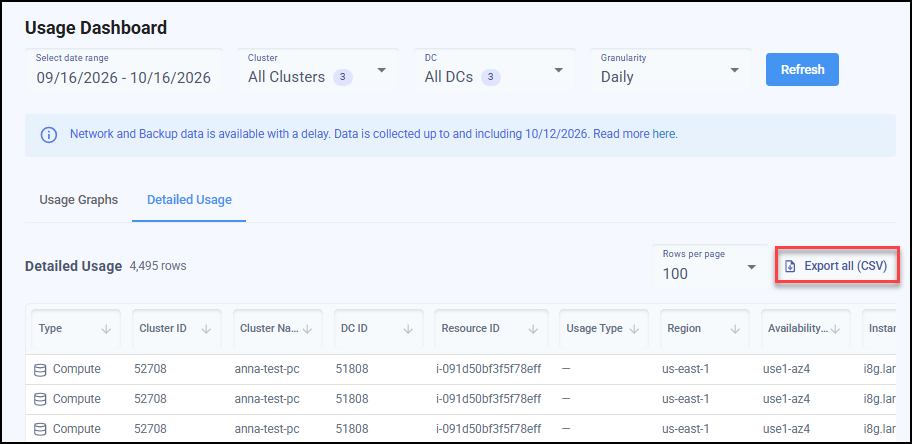
The file contains all usage data for the date range, clusters, datacenters, and granularity selected at the top of the page. The column filters on the Detailed Usage tab are not applied, so the file includes all rows, not only the ones currently displayed in the table.
The file has the same columns as the table. It is generated by the Metering API, so it is identical to the CSV file that you can retrieve programmatically.