
Was this page helpful?
Configure Availability Zones
This page describes how to configure Availability Zones (AZs) for your cluster and explains the impact of different configurations on availability, performance, and cost.
Overview
The Availability Zones setting lets you select a specific physical zone ID for each cluster zone. This is useful when you want to align your cluster placement with your application infrastructure.
This is particularly important on Amazon Web Services (AWS), where Availability
Zone names (for example, us-east-1a) are account-specific and may map to
different physical zones across different accounts. To ensure consistent
identification of physical zones, AWS provides Availability Zone IDs (for
example, use1-az1), which are consistent across accounts.
👉 Always match AZs using AZ IDs, not AZ names.
If the AZ IDs used by your ScyllaDB Cloud cluster and your application do not match, traffic between them may be routed across different physical availability zone boundaries, even if the AZ names appear identical. This can result in increased latency and additional cross-AZ data transfer costs.
Example
Account |
AZ name |
AZ ID |
|---|---|---|
ScyllaDB Cloud |
us-east-1a |
use1-az1 |
Customer Environment |
us-east-1a |
use1-az3 |
In this example, although both environments use the same AZ name (us-east-1a),
the ScyllaDB Cloud cluster and the customer environment map to different physical
Availability Zones (AZ IDs: use1-az1 and use1-az3). Since the physical
zones differ, traffic is routed across Availability Zones.
For more details on how AZ names and AZ IDs differ across accounts, see AWS documentation.
Multi-AZ Deployment (Default)
By default, each cluster zone is deployed in a different cloud availability zone to provide high availability.
For production workloads, it is recommended to:
Configure a replication factor of 3.
Place one cluster zone in each AZ.
This configuration ensures:
Each AZ contains a single replica.
The cluster can tolerate a full AZ failure.
Quorum is maintained (for example, with
LOCAL_QUORUM).
Single-AZ Deployment
For development, testing, or cost-sensitive environments, you can deploy multiple cluster zones within a single availability zone.
This configuration helps reduce cross-AZ traffic costs and lowers overall infrastructure expenses. Its downside is that it provides less fault tolerance compared to multi-AZ deployments.
Nodes are placed in separate spread placement groups within the availability zone to reduce the impact of individual cloud server failures. However, failures affecting the entire availability zone may impact all nodes simultaneously.
Caution
Deploying multiple nodes within the same cloud availability zone can lower infrastructure costs, but increases the risk of a full cluster outage. A disruption affecting that cloud availability zone may impact all nodes simultaneously, making the cluster unavailable.
How to Configure Availability Zones
You can configure availability zones when creating a cluster:
Go to the cluster creation page.
In the Initial Deployment section, find the fields labeled Zone (showing zone IDs like
use1-az1).For each cluster zone, select an availability zone from the dropdown menu.
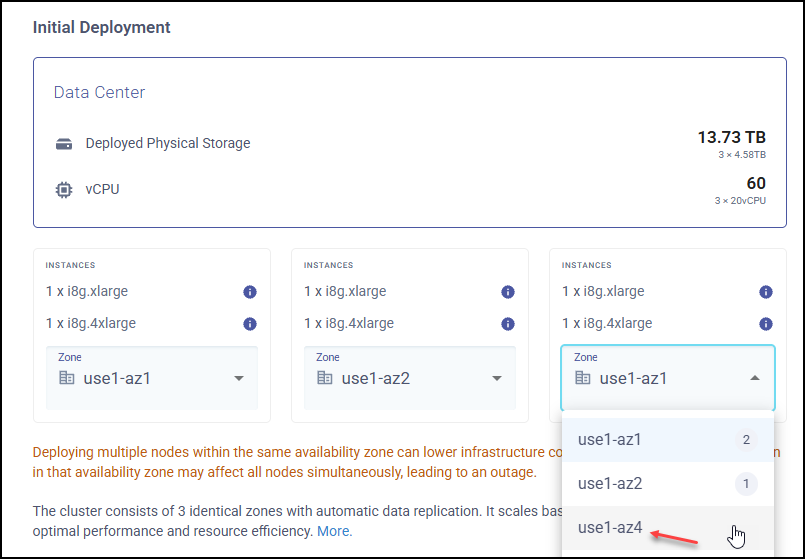
Make sure your selection aligns with:
Your application’s availability zones
High availability requirements
Cost considerations