ScyllaDB University Live | Free Virtual Training Event
Learn more
ScyllaDB Documentation Logo Documentation
  • Deployments
    • Cloud
    • Server
  • Tools
    • ScyllaDB Manager
    • ScyllaDB Monitoring Stack
    • ScyllaDB Operator
  • Drivers
    • CQL Drivers
    • DynamoDB Drivers
    • Supported Driver Versions
  • Resources
    • ScyllaDB University
    • Community Forum
    • Tutorials
Install
Search Ask AI
ScyllaDB Docs ScyllaDB Cloud Configure Network Access Configure Private Connectivity
For AI agents: a documentation index is available at https://cloud.docs.scylladb.com/master/llms.txt. A Markdown version of this page is at https://cloud.docs.scylladb.com/master/cluster-connections/private-connectivity/index.md.

Configure Private Connectivity

Available with the Premium plan

Private Connectivity routes all database traffic between your application and ScyllaDB Cloud exclusively over the cloud provider’s backbone network, with unidirectional connectivity, no public internet exposure, and no CIDR conflicts commonly associated with VPC peering.

On AWS, Private Connectivity uses AWS PrivateLink.
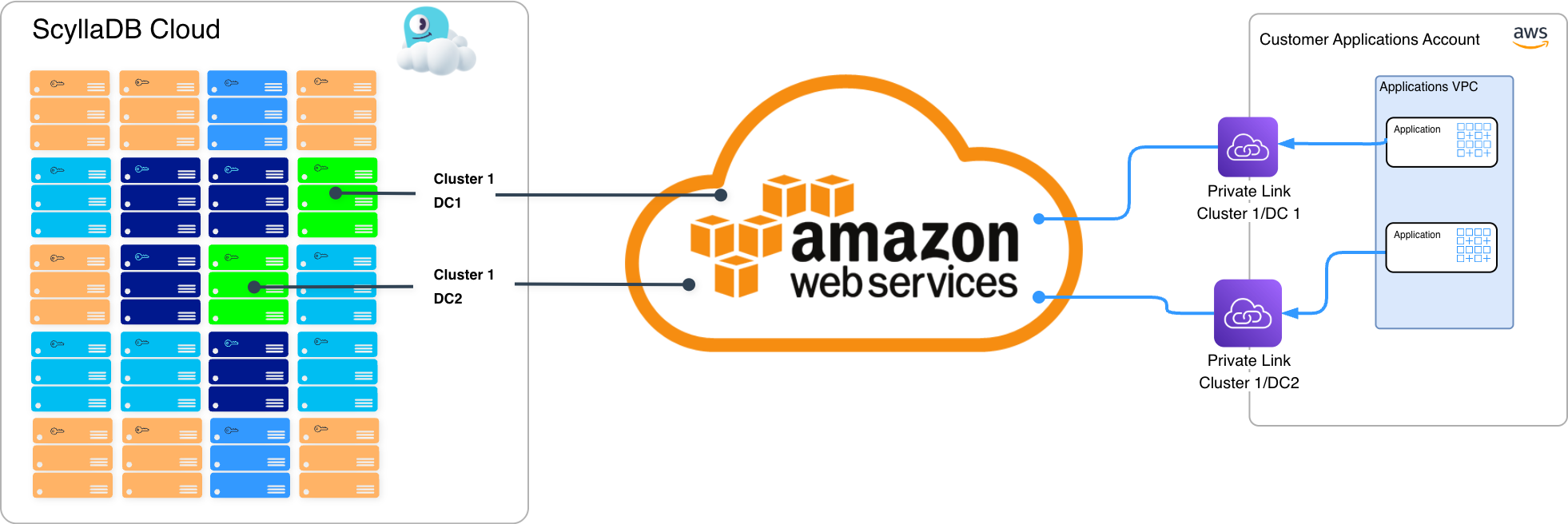
Private Connectivity with AWS PrivateLink

On GCP, it uses GCP Private Service Connect.
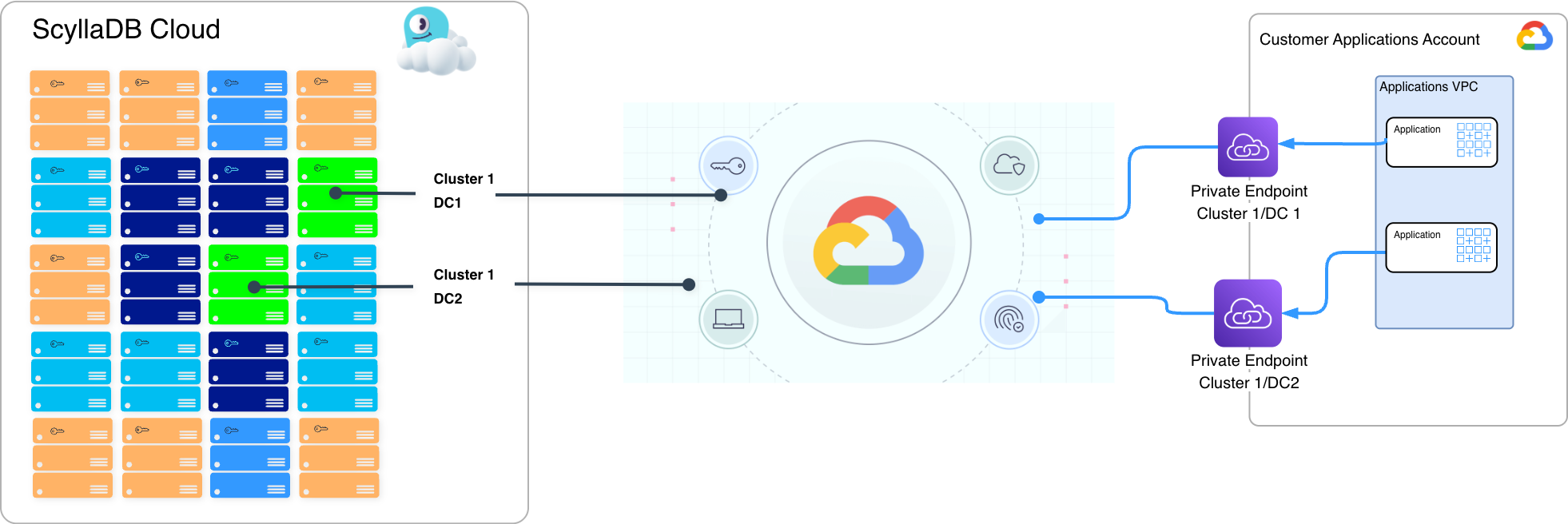
Private Connectivity with GCP Private Service Connect

Setting up a private connection involves two steps: creating the service endpoint in the ScyllaDB Cloud console, and creating the consumer endpoint in your own AWS or GCP account. Both steps are covered in the guides below, organized by cloud provider.

  • Private Connectivity with AWS
  • Private Connectivity with GCP

Feature Status

Private Connectivity is configured per datacenter. If your cluster spans multiple datacenters, you can configure a separate private connection for each datacenter.

Why Use Private Connectivity

VPC Peering and Transit Gateway require bidirectional routing between your VPC and ScyllaDB Cloud, which many enterprise security teams flag as too broad an exposure. Private Connectivity addresses this with a strictly unidirectional, service-scoped model.

Key benefits:

  • No public internet exposure. Traffic stays entirely within the cloud provider’s backbone network. No internet gateway, NAT device, or public IP address is required on either side.

  • Unidirectional by design. Your VPC initiates connections to ScyllaDB Cloud. ScyllaDB Cloud cannot initiate connections into your environment.

  • Zero Trust posture. ScyllaDB cannot reach into your network. Access is scoped to the ScyllaDB service endpoint only, limiting blast radius to a single service.

  • Zero CIDR conflict risk. There is no VPC peering relationship between the consumer and producer VPCs. IP address ranges do not need to be coordinated.

  • Compliance alignment. Private Connectivity satisfies the network isolation requirements of PCI-DSS, HIPAA, SOC 2 Type II, and FedRAMP.

  • Simplicity. No IP allowlists, no route table changes on both sides.

  • Full Shard, Token and Rack Awareness. Private Connectivity maintains full shard, token, and rack awareness when used with the supported ScyllaDB Cloud drivers.

You can use Private Connectivity alongside VPC Peering or Transit Gateway on the same cluster. Combining connection types is supported but weakens the network isolation guarantees described above. Limit this to cases where explicitly required.

How It Compares to VPC Peering

Attribute

Private Link / PSC

VPC Peering

Customer setup

Endpoint attachment only (simple)

Route tables on both sides (moderate)

IP conflict risk

None — IPs are fully independent

CIDRs must not overlap

Network adjacency

None — unidirectional only

Bidirectional routing established

Provider-initiated connections

Impossible by design

Theoretically possible via misconfigured security groups

Blast radius

Scoped to one service only

Any resource in the peered VPC

Enterprise security posture

Meets the stricter requirements of regulated industries

Considered insecure by many enterprise security teams

Security and Compliance Alignment

Requirement

How Private Link / PSC Addresses It

Data stays within the cloud boundary

Routed via cloud provider backbone only — never internet-routed

Network segmentation

No shared routing table; strictly unidirectional connectivity; customer initiates the connection

Third-party access control

Customer creates/revokes endpoints in their VPC — immediate, no coordination needed

Zero Trust posture

Provider cannot initiate connections into the customer environment

Zero network adjacency

No bidirectional routing established; ScyllaDB Cloud cannot initiate connections into customer VPC

All of the above are often strong recommendations for PCI-DSS, HIPAA, and SOC 2 Type II.

Cost Considerations

Private Connectivity does not add charges to your ScyllaDB Cloud subscription. However, because the feature relies on AWS PrivateLink or GCP Private Service Connect infrastructure provisioned in your cloud account, you will incur additional charges from your cloud provider. These charges are either billed directly to you by AWS or GCP or, if billed to the provider side, passed through as-is by ScyllaDB Cloud.

Those charges depend on:

  • The number of VPC endpoints and Availability Zones in use (hourly charge per AZ).

  • The volume of data processed through the private endpoint each month.

Was this page helpful?

PREVIOUS
Configure Virtual Private Cloud (VPC) Peering with GCP
NEXT
Private Connectivity with AWS
  • Create an issue

On this page

  • Configure Private Connectivity
    • Feature Status
    • Why Use Private Connectivity
    • How It Compares to VPC Peering
    • Security and Compliance Alignment
    • Cost Considerations
ScyllaDB Cloud
Search Ask AI
  • Get Started
    • What Is ScyllaDB Cloud?
    • Free Trial
    • Quick Start Guide
    • Billing and Pricing
  • Create & Connect to Your Cluster
    • Deployment Overview
    • Configure and Launch a Cluster
    • Connect to Your Cluster
    • X Cloud Autoscaling Behavior and Best Practices
    • Deploy to Your Own AWS Account (BYOA)
    • Deploy to Your Own GCP Account (BYOA)
    • Configure Availability Zones
    • Cluster Setup Best Practices
    • Standard Clusters
  • Configure Network Access
    • Network Access Options
    • Configure AWS Transit Gateway (TGW) VPC Attachment Connection
    • Configure VPC Peering
      • VPC Peering with AWS
      • VPC Peering with GCP
    • Configure Private Connectivity
      • Private Connectivity with AWS
        • Configure AWS PrivateLink in ScyllaDB Cloud
        • Connect Your AWS VPC to ScyllaDB Cloud
      • Private Connectivity with GCP
        • Configure GCP Private Service Connect in ScyllaDB Cloud
        • Connect Your GCP VPC to ScyllaDB Cloud
    • Migrate a Cluster Connection
    • Check Cluster Availability
    • Glossary for Cluster Connections
  • Operate and Manage Clusters
    • Resize a Cluster
    • Add a Datacenter
    • Delete a Cluster
    • Configure Maintenance Windows
    • Configure Notifications
    • Track Resource Usage
    • Monitor Clusters
    • Monitor with Prometheus
    • Backups
  • Use ScyllaDB
    • Application Best Practices
    • Apache Cassandra Query Language (CQL)
    • ScyllaDB Drivers
    • Data Modeling
    • Tracing
    • Change Data Capture (CDC)
    • Role Based Access Control (RBAC)
    • ScyllaDB Alternator (DynamoDB-compatible API)
    • Lightweight Transactions (LWT)
    • ScyllaDB Integrations
  • Security
    • Security Best Practices
    • Security Concepts
    • Database-level Encryption
    • Storage-level Encryption
    • Client-to-node Encryption
    • Service Users
    • User Management
    • SAML Single Sign-On (SSO)
    • Immutable (WORM) Backups
    • Data Privacy and Compliance
  • Vector and Text Search
    • Quick Start Guide
    • Vector and Text Search Concepts
    • Vector and Text Search Deployments
    • Sizing and Capacity Planning
    • Working with Vector and Text Search
    • Working with Full Text Search
    • Vector Search with Alternator
    • Filtering
    • Quantization and Rescoring
    • LangChain and CassIO Compatibility
    • Security
    • Troubleshooting
    • FAQ
    • Glossary
    • Reference
    • Example Project
  • Cost Optimization
    • Cost Optimization Overview
    • Advanced Internode (RPC) Compression
    • Datacenter Placement and Data Transfer Costs
  • Automate with the ScyllaDB Cloud API
    • Programmatic Access Overview
    • Create a Personal Token for Authentication
    • API Reference
    • API Error Codes
    • Terraform Provider for ScyllaDB Cloud
    • ScyllaDB Cloud MCP Server
  • Get Help
    • FAQ
    • Tutorials
    • Getting Help
Docs Tutorials University Contact Us About Us
© 2026, ScyllaDB. All rights reserved. | Terms of Service | Privacy Policy | ScyllaDB, and ScyllaDB Cloud, are registered trademarks of ScyllaDB, Inc.
Last updated on 02 Oct 2026.
Powered by Sphinx 9.1.0 & ScyllaDB Theme 1.9.3