Was this page helpful?
X Cloud Autoscaling Behavior and Best Practices
X Cloud Auto Scaling
The serverless architecture behind X Cloud is designed to deliver performance, scalability, and cost efficiency without operational overhead. It automatically ensures your cluster has the right level of resources at the right time, eliminating the need for manual over-provisioning or the risk of underutilization.
With X Cloud, you no longer need to manage capacity planning, manual scaling, or complex cluster rebalancing. This allows your team to focus entirely on building applications while the infrastructure manages itself.
X Cloud clusters scale automatically within a selected instance family, using a mix of instance sizes. The system dynamically adjusts cluster capacity as storage demand increases or decreases, providing several key benefits:
Avoids over-provisioning by continuously aligning capacity with real-time demand.
Enables up to 90% storage utilization, maintaining performance while minimizing cost.
Accelerates scaling—thanks to the tablet-based architecture, new nodes are added in parallel and rapidly rebalanced.
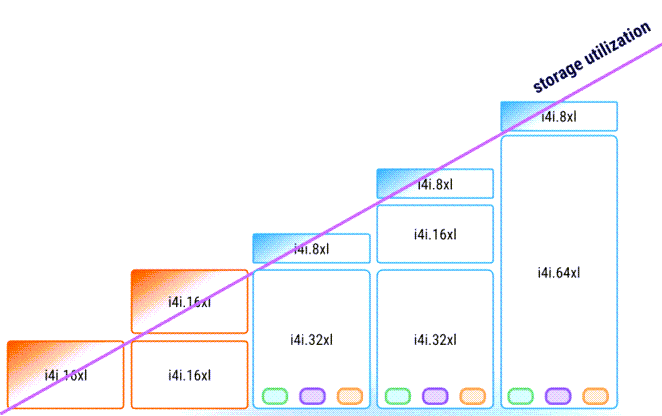
X Cloud clusters are auto-scaled within one predefined instance family, but with different instance types to ensure optimal storage utilization. See Auto Scaling Policy for details.
How X Cloud Autoscaling Works
ScyllaDB Cloud continuously monitors your cluster to keep resource usage as close as possible to a specified target utilization. For example, if you set a target of 90% storage utilization, the system automatically adjusts the cluster configuration to try to maintain that level. This is an ongoing process. If a cluster needs adjustment, ScyllaDB Cloud will perform a scaling operation.
Scaling
Scaling Up: If utilization rises above the target threshold, the system adds more instances or transitions to larger instance sizes to adjust the cluster shape. This usually occurs when utilization exceeds the target by more than 5%.
Scaling Down: If utilization falls below the target, the system reduces the number of instances or switches to smaller instance sizes to reduce costs. This occurs when utilization falls more than 5% below the target. The resulting configuration should remain as close as possible to the target while factoring in capacity precision.
Scaling Precision
While the cluster capacity gravitates toward your target, achieving an exact value is not always possible because scaling occurs in increments fixed based on instance capacity. This precision is limited by the size of the smallest available instance, which, in most cases, is 503 GB. This means that while a 50 TB cluster might see 1% storage adjustments, a small 503 GB cluster would scale by 100% increments.
You can restrict this, further reducing the precision of scaling.
Instance Selection and Optimization
By default, X Cloud uses all instance types within a selected family. In some cases, you may want to restrict the instance sizes used. This is convenient if you want to take advantage of specific pricing agreements. However, such limitations may introduce scaling precision or lead to capacity issues.
If all requested instance types are unavailable, X Cloud automatically scales the cluster using alternative instance types to keep it running. Once the requested instance types become available again, X Cloud automatically replaces the alternatives with the requested types.
Reduced Scaling Precision
Limiting available instance types can be useful for optimizing the cost, but can reduce scaling granularity. For example, disabling the smallest type (e.g., i8g.large) forces the ScyllaDB Cloud to use larger increments like i8g.xlarge (1006 GB) or i8g.2xlarge (2013 GB), making scaling of clusters less precise.
Cloud Provider Capacity Issues
Highly restrictive configurations can expose your cluster to capacity shortages within specific cloud regions or availability zones. If a cloud provider runs out of a specific instance size, the ScyllaDB Cloud normally proposes an alternative configuration to ensure success. However, if you have blocked those alternatives, reconfiguration may become impossible.
Recommendations for Optimal Scaling
Best Practice: Allow all instance types within a selected family to be used in the autoscaling process, ensuring the highest precision and stability.
Minimum Requirement: If you have to restrict instance selection, allow at least three instance types within the family to maintain basic scaling flexibility.