Was this page helpful?
Cluster Types - X Cloud and Standard
Overview
When creating a cluster, you can choose between a Standard or an X Cloud cluster.
X Cloud clusters offer up to 90% storage utilization, better elasticity, and faster scaling.
Standard clusters offer up to 70% storage utilization.
Standard |
X Cloud |
|
|---|---|---|
Tablets |
Yes (default) |
Yes (enforced) |
vNodes |
Yes |
No |
Storage Utilization |
Up to 70% |
Up to 90% |
Multi-DC |
Yes |
No |
Vector Search |
Yes |
Yes |
ScyllaDB Features |
Full |
Full |
X Cloud Clusters
If you choose the X Cloud option, the better tablets-based data replication in your cluster is enforced on all keyspaces. Owing to tablets, X Cloud clusters provide better elasticity, faster scaling, and allow you to reach up to 90% storage utilization.
X Cloud doesn’t support multi-datacenter (multi-DC) deployments. We are actively working to add multi-DC support in an upcoming release.
X Cloud Auto Scaling
The serverless architecture behind X Cloud is designed to give you the speed, scalability, and cost control you need — without the operational burden. You always have the right level of performance at the right time, eliminating overprovisioning and underutilization. X Cloud eliminates manual scaling, capacity planning, and cluster rebalancing, freeing your team to focus on applications, not infrastructure.
X Cloud clusters scale automatically using different instance families and a mix of instance sizes, increasing or decreasing new instances as the storage grows or drops. This brings multiple benefits to the scaling process.
You avoid overprovisioning. The cluster capacity is automatically adjusted to match real-time demand.
It enables up to 90% storage utilization, allowing you to maintain reliable performance at the lowest possible cost.
Scaling is faster. Due to the tablets-based replication architecture, new nodes can be added in parallel and almost instantly balance the load.
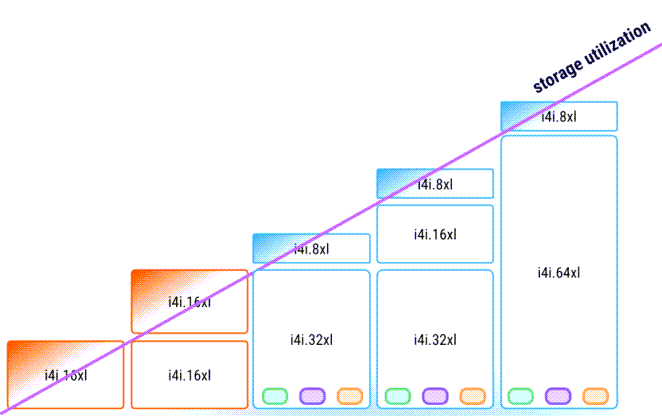
X Cloud clusters are auto-scaled within one predefined instance family, but with different instance types to ensure optimal storage utilization. See Scaling Policy for details.
Auto Scaling Policy
When you create an X Cloud cluster, you can define an initial auto-scaling policy. You can update that policy later as needed.
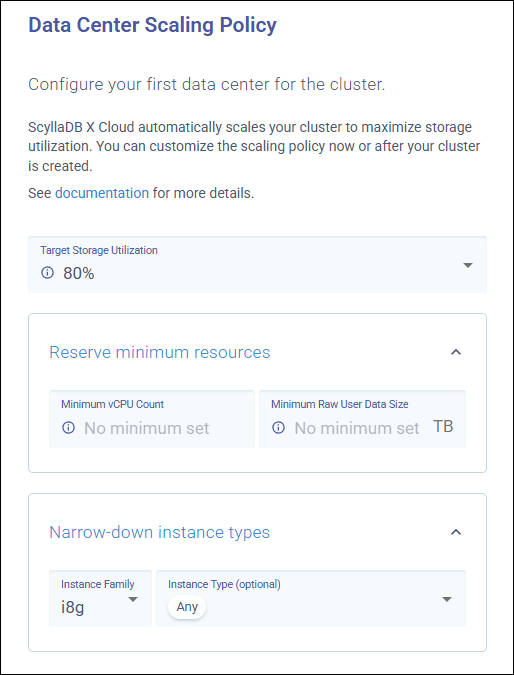
To define the initial auto-scaling policy when creating a new cluster, configure the options in Data Center Scaling Policy.
Target Storage Utilization
Target Storage Utilization specifies the storage utilization you want to maintain. ScyllaDB will be performing auto-scaling operations with the goal of maintaining the storage utilization level specified by this option.
The default is 80%.
The maximum is 90%.
You should adjust the value depending on the workload. For workloads with a high volume of write operations, we recommend values lower than 85 to ensure that the ScyllaDB Cloud will be able to scale the cluster. If the storage utilization is set too high the cluster will scale later and might throtle the operations.
Reserving Minimum Resources
The Minimum Physical Storage and Minimum vCPU Count options allow you to reserve minimum resources for your cluster.
Minimum Physical Storage
Specifies the minimum physical storage capacity. You can customize it depending on the initial load you anticipate for your cluster. If set, ScyllaDB Cloud will never scale the cluster below this capacity, even if storage is underutilized. Automatic downscaling operations will respect this minimum. By default, no minimum size is set.
To determine an appropriate value, you can use the built-in storage calculator.
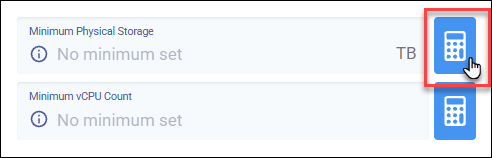
The calculator estimates the recommended minimum physical storage based on the following inputs:
Raw Data Size - The total amount of uncompressed user data you expect to store in the cluster (before replication and compression).
Target Storage Utilization - Defines how full the storage is allowed to get before scaling occurs. This ensures adequate capacity to handle compaction, repairs, and workload spikes.
Replication Factor - X Cloud clusters are deployed across 3 availability zones, and the replication factor cannot be configured. It is always set to 3 to ensure high availability.
Compression Savings - ScyllaDB uses Zstandard (ZSTD) compression. This setting represents the estimated percentage of storage saved due to compression. Typical workloads often achieve 50% or higher compression, but actual results depend on data characteristics.
Minimum vCPU Count
Specifies the minimum number of vCPUs to reserve compute capacity for that particular cluster. You can customize it depending on the initial load you anticipate for your cluster. If set, ScyllaDB Cloud will never scale the cluster below this vCPU count, even during automatic downscaling operations. By default, no minimum vCPU count is set.
To estimate the required compute capacity, you can use the built-in vCPU calculator.
The calculator estimates the recommended minimum vCPU count based on the following inputs:
Instance Family - Defines the instance family used for the cluster, which affects how much workload each vCPU can handle.
Reads per Second - The number of read operations the workload is expected to perform.
Writes per Second - The number of write operations the workload is expected to perform.
Schema Complexity - Reflects how complex your data model and queries are:
Simple– No indexes, up to 5 columns, basic queries.Moderate– Includes a single advanced feature such as a secondary index, materialized view, or CDC.Complex– Uses lightweight transactions (LWT) or multiple advanced features.
Instance Family and Type
The Instance Family and Instance Type options allow you to narrow down the instances to be used for auto-scaling:
Instance Family - Specifies the instance family to be used for auto-scaling. X Cloud clusters are scaled automaticaly within one predefined instance family.
Instance Type - Specifies instance types to be used for auto-scaling. By default, all instance types within a given family can be used when auto-scaling a cluster to optimize storage utilization and compute.
Initial Deployment Summary
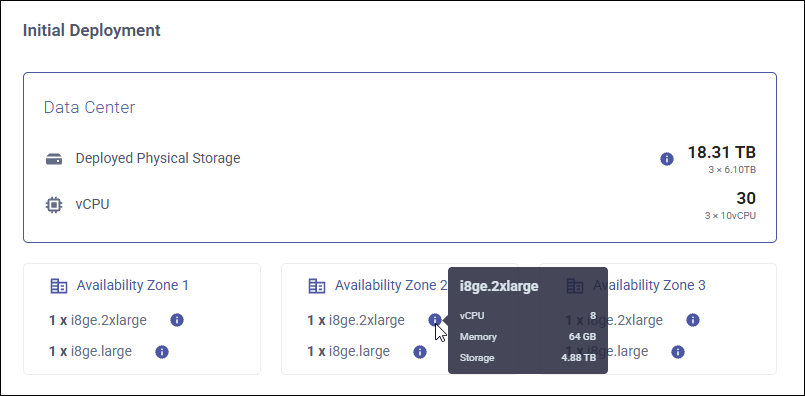
After you customize the auto-scaling policy, the Initial Deployment summary will show:
Deployed Physical Storage - The total initial amount of physical storage allocated to all nodes in the cluster.
vCPU - The number of vCPUs.
Availability Zones - The availability zones with the instance type configuration for each zone. The cluster consists of three zones with automatic data replication, each with the same instance type configuration. By default, each cluster zone is deployed in a different cloud availability zone. You can customize the availability zones for your cluster, but we recommend that you deploy each zone in a different cloud availability zone to ensure high availability. See Configure Availability Zones for details.
Updating Auto-Scaling Policy for an Existing Cluster
To modify the auto-scaling policy for an existing cluster, go to your cluster’s page and click Edit Scaling Policy.

Replication Factor (RF)
When using certain ScyllaDB features, the RF must be set to match the number of racks in ScyllaDB Cloud. ScyllaDB Cloud is configured with three racks, so the RF should be set to 3 when you use these features.
The features that require this configuration are:
Materialized Views (MV)
Secondary Indexes (SI)
Alternator
CDC
Standard Clusters
If you choose the Standard option, data replication in your cluster can be based on tablets (default) or vnodes, depending on the configuration of your keyspaces.
When you CREATE a keyspace, it has tablets enabled by default. To use vnodes-based data replication, you must explicitly disable tablets when you CREATE a keyspace. See Enabling Tablets in the ScyllaDB documentation for instructions.
A Standard cluster allows you to reach up to 70% storage utilization.
References
See Data Distribution with Tablets in the ScyllaDB documentation for more information about tablets.